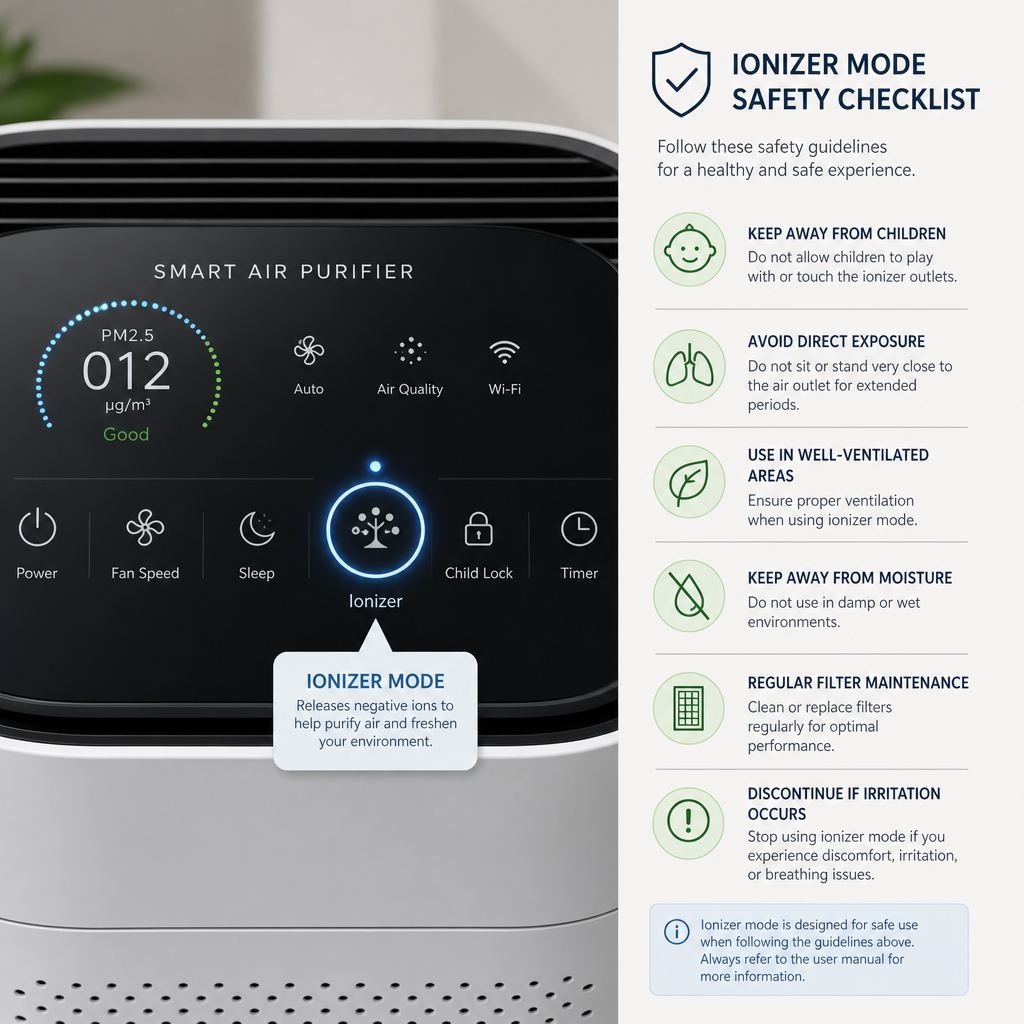
Air purifier safety check
The Small Button on Your Purifier Deserves a Closer Look
Many air purifiers include an ionizer, plasma, UV, photocatalytic, or “extra cleaning” mode. Some features may be harmless when properly certified and used as directed. Others deserve a careful look because ozone is not something to casually add to an occupied room.
Quick answer
Should you use the ionizer button on an air purifier?
Do not turn on an ionizer, ozone, plasma, UV, or “extra cleaning” mode until you know exactly what the feature does, whether it can produce ozone, and whether the device is certified for low ozone emissions where that certification applies. The safest default for most homes is to rely first on proper room sizing, strong particle filtration, enough airflow, clean filters, and source control.
EPA guidance warns that no federal agency has approved ozone generators for use in occupied spaces, and CARB requires many air cleaners sold in California to meet ozone-emission rules. In plain English: a purifier should clean the air without creating a new indoor-air concern.
Ionizer, UV, Plasma, and Ozone: What Is the Difference?
| Feature label | What it usually means | What to verify |
|---|---|---|
| Ionizer | Charges particles so they may clump, attach to surfaces, or be captured more easily. | Whether it produces ozone, whether it can be turned off, and whether the unit is certified for ozone emissions. |
| UV-C | Uses ultraviolet light inside the unit, often marketed for microbial reduction. | Whether the design exposes air long enough to matter, whether ozone is produced, and whether lamps require replacement. |
| Plasma / bipolar ionization | Uses charged particles or reactive processes to treat air. | Independent safety data, ozone claims, byproduct information, and whether the feature can be disabled. |
| Photocatalytic oxidation | Uses light and a catalyst to react with certain pollutants. | Possible byproducts, ozone information, and whether claims are supported by credible testing. |
| Ozone generator | Intentionally creates ozone, often marketed for odor treatment. | Avoid use in occupied spaces. Treat this as a separate hazard, not a normal purifier setting. |
The Five-Step Safety Check Before You Turn It On
Find the exact feature name in the manual
Marketing labels can be vague. “Fresh air,” “plasma,” “active purification,” and “extra cleaning” may not explain what the purifier is actually doing.
Check whether the feature can produce ozone
Ozone is useful high in the atmosphere but can be harmful to breathe indoors. If the device intentionally creates ozone, do not treat it like a standard room air purifier.
Look for certification, not just a promise
A product page may say “safe,” “low ozone,” or “ozone-free,” but a careful buyer should look for credible certification or test details. CARB maintains a list of certified air-cleaning devices.
Ask whether you need the feature at all
For most everyday homes, the big performance drivers are still CADR, filter design, fan speed, room fit, placement, and maintenance. Optional electronic features should not distract from those basics.
Be extra cautious around sensitive occupants
Children, older adults, people with asthma or other respiratory conditions, and pets may be more vulnerable to poor indoor-air decisions. A questionable feature is not worth gambling with.
What to Prioritize Instead
Room fit and CADR
Choose a purifier that can move enough filtered air for the actual room size, ceiling height, and layout.
Filter design
Use particle filtration for dust, pollen, dander, and smoke particles. Use meaningful carbon media when odors or gases are a concern.
Maintenance you will do
A clean, properly fitted replacement filter is more valuable than an advanced feature on a neglected purifier.
Interactive knowledge check
Would You Turn the Feature On?
Answer these four questions before using an electronic air-cleaning mode.
Reader check-in
What Does Your Purifier Call This Feature?
If your purifier has an ionizer, UV, plasma, or “fresh air” setting, share the exact model and the wording used in the manual. These labels are not always clear, and real examples help other readers know what to investigate before turning a feature on.
- Does the feature have a separate on/off control?
- Does the manual mention ozone?
- Is the exact model listed as CARB-certified?
- Does the purifier work well with the feature turned off?
FAQs About Ionizers, Ozone, and Air Purifiers
Are ionizer air purifiers always unsafe?
Not every ionizer is the same, but the feature deserves scrutiny. Check whether the exact model is certified for low ozone emissions, whether the feature can be disabled, and whether the purifier performs well using mechanical filtration alone.
Is ozone the same as clean air?
No. Ozone is a reactive gas. It is not something most households should intentionally add to occupied indoor air. Proven indoor-air strategies start with source control, ventilation when appropriate, and effective filtration.
Does UV make an air purifier better?
UV may have a role in some well-designed systems, but buyers should verify design details, lamp maintenance, ozone information, and whether the feature solves their actual air-quality concern. Do not let UV distract from CADR and filter quality.
What is CARB certification?
CARB certification refers to California Air Resources Board requirements for certain air-cleaning devices. Electronic air cleaners must meet ozone-emission limits to be certified. Buyers should search by exact model.
What is the safest purifier setup for most homes?
For most homes, start with a properly sized purifier that has strong particle filtration, enough airflow, clear replacement-filter availability, reasonable noise, and no questionable ozone-producing feature needed for normal operation.
Continue learning
Related Best Smart Purifiers Guides
Understanding Air Purifier Technology
Compare HEPA-style filtration, activated carbon, UV, ionization, and other technologies before buying.
Compare filter technologiesSmart Air Purifiers Guide
Learn how sensors, auto mode, schedules, app controls, and smart-home integration should support—not replace—core filtration.
Explore smart purifier featuresComprehensive Air Purifier Guide
Start with room size, CADR, filter type, noise, placement, and maintenance before comparing extra features.
Read the complete buying guideIs Your Home’s Air Toxic?
Think beyond the device and identify indoor sources, safety issues, and problems filtration cannot solve alone.
Review indoor-air basicsEditorial note: BestSmartPurifiers.com provides research-based consumer education. This article is not medical, legal, HVAC, or product-safety advice. Always verify the exact model, manual, certification status, and manufacturer instructions before using optional electronic air-cleaning features.