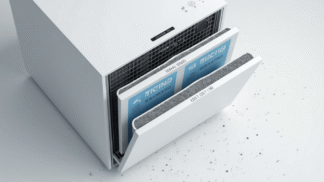
Your air purifier is not a set-it-and-forget-it appliance forever. It can quietly improve the air in a room, but only when the filter is clean, the airflow is open, the sensors are not covered in dust, and the unit is placed where it can actually move air.
The good news is that air purifier maintenance is simple. Most of it comes down to a few repeatable habits: check the filters, clean the intake, wipe the exterior, keep space around the unit, and replace parts on schedule.
Quick answer: To maintain your air purifier, check the filter every month, clean washable pre-filters when the manual allows, replace disposable HEPA and carbon filters on schedule, keep the intake and outlet clear, wipe dust from the exterior and sensor area, and reset the filter indicator after every replacement. A clean purifier moves air more efficiently and helps preserve the performance you bought it for.
Important: Not every filter can be washed. Many HEPA and carbon filters are disposable and can be damaged by water. Always check your owner’s manual before vacuuming, washing, or reusing any filter.
Air Purifier Maintenance Knowledge Check
Before you clean your purifier, test what you know. These quick questions can prevent some of the most common mistakes.
- Can every air purifier filter be washed?
No. Wash only filters the manufacturer clearly labels as washable. - Does a filter light always mean the filter is visibly dirty?
No. Some filter indicators are based on run time, not visible dirt. - Can a purifier work well if it is tucked behind furniture?
No. Blocked airflow reduces performance. - Should you replace carbon filters even if the purifier still turns on?
Yes. Carbon can become saturated and lose odor-reducing ability. - Is filter cost part of air purifier ownership?
Yes. Replacement filters are one of the biggest long-term costs.
Why Air Purifier Maintenance Matters More Than Most People Think
A new air purifier usually feels simple. Plug it in, tap the power button, and let it run. For the first few weeks, that may be enough. But over time, dust collects on the intake. Pet hair sticks to the pre-filter. Fine particles load the main filter. Activated carbon starts to lose odor-control power. Sensors can become less responsive if dust builds up around them.
None of this means your purifier is broken. It means it is doing work.
Think of your air purifier like a small air-moving system. The fan pulls room air through the filter. The filter captures particles. The cleaned air returns to the room. If the filter is clogged or the intake is blocked, the whole process becomes weaker. The purifier may still make noise and show a light, but it may not be moving enough clean air to make a meaningful difference.
That is why maintenance is not just about keeping the appliance neat. It is about protecting airflow, filtration, energy use, and long-term performance.
The Simple Air Purifier Maintenance Schedule
Every model is different, so your owner’s manual should always be the final guide. Still, this schedule works as a practical starting point for most home smart air purifiers.
| Task | How Often | Why It Matters |
|---|---|---|
| Check the filter indicator | Weekly or when the app alerts you | Helps you catch maintenance needs before performance drops. |
| Inspect the pre-filter | Every 2–4 weeks | Pet hair, lint, and dust can block airflow before air reaches the main filter. |
| Wipe the exterior and grille | Monthly | Keeps dust from building up around the intake and outlet. |
| Clean washable pre-filters | Monthly or as directed | Can extend performance when the purifier design allows cleaning. |
| Replace HEPA-style filters | As the manufacturer recommends | Disposable particle filters lose airflow as they load with dust and particles. |
| Replace activated carbon filters | As the manufacturer recommends | Carbon can become saturated and stop reducing odors effectively. |
| Check placement and clearance | Monthly | Furniture, curtains, boxes, and walls can block air movement. |
| Reset the filter light | After filter replacement | Keeps reminders accurate for the next maintenance cycle. |
If you have pets, smoke exposure, heavy dust, nearby construction, wildfire smoke, high pollen, or a purifier running around the clock, check filters more often. Harder-working purifiers usually need closer attention.
Need the Right Replacement Filter?
Filter compatibility matters. Before ordering, check the brand, model number, filter code, and shape of your current filter. A filter that almost fits is not good enough for airflow or sealing.
Partner link. Always verify purifier model compatibility before purchasing.
How to Clean Your Air Purifier Safely
Most air purifier cleaning is simple, but there is one rule that matters most: unplug the unit before cleaning it. You are working around a fan, electrical parts, sensors, and filters, so do not clean it while it is running.
Step 1: Turn it off and unplug it
Never remove filters or wipe inside the housing while the purifier is powered on. Give the fan a moment to stop completely.
Step 2: Remove the filter cover
Open the front, back, or bottom panel depending on the design. Take a quick photo before removing parts if you are worried about forgetting the filter order.
Step 3: Inspect the pre-filter
If your purifier has a washable or vacuumable pre-filter, clean it according to the manual. If it is disposable, do not wash it unless the manufacturer says you can.
Step 4: Check the main filter
Look for heavy dust, discoloration, odors, or airflow restriction. If the filter is disposable and past its service life, replace it. Do not rinse a disposable HEPA-style filter unless the manual clearly says it is washable.
Step 5: Wipe the housing and grille
Use a soft, slightly damp cloth for the outside. Avoid harsh cleaners, soaking water, or sprays that can enter the machine. A dry microfiber cloth works well around vents and sensor areas.
Step 6: Reassemble and reset
Put the filters back in the correct direction, close the panel securely, plug the unit in, and reset the filter indicator if you installed a new filter.
Filter Types: What to Clean, What to Replace, and What to Leave Alone
Air purifier maintenance gets confusing because different filters do different jobs. Some are meant to be cleaned. Others are meant to be replaced. Treating every filter the same way can reduce performance or damage the filter.
| Filter Type | Common Job | Maintenance Tip |
|---|---|---|
| Pre-filter | Catches larger dust, lint, hair, and pet fur before they reach the main filter. | Often washable or vacuumable, but check your manual first. |
| HEPA-style filter | Captures fine particles such as dust, pollen, smoke particles, and dander. | Usually disposable. Replace on schedule unless clearly labeled washable. |
| Activated carbon filter | Helps reduce some odors and certain gases. | Replace when saturated or on the recommended schedule. Washing usually does not restore it. |
| Combination filter | Combines particle filtration and carbon in one cartridge. | Replace the entire cartridge according to the purifier’s instructions. |
| Sensor area | Helps detect air quality changes on smart models. | Gently dust around the sensor opening. Avoid liquid cleaners unless the manual allows it. |
When in doubt, replace rather than wash a disposable filter. A wet or damaged filter can restrict airflow, shed material, grow odor, or stop sealing correctly.
Placement Is Part of Maintenance
Even a clean purifier can underperform if it is in the wrong spot. Placement affects how much room air reaches the filter and how well cleaner air circulates afterward.
Keep It Open
Leave space around the intake and outlet. Avoid corners, curtains, tight shelves, and furniture barriers.
Use the Right Room
Place the purifier where you spend time, such as a bedroom, home office, nursery, living room, or pet area.
Avoid Dirty Zones
Do not place it where grease, moisture, or heavy debris can damage the unit unless the manual says it is safe.
Bedrooms are often a smart priority because people spend many hours sleeping there. Home offices are another good choice because cleaner air and lower dust can make the room feel more comfortable during long work sessions.
Troubleshooting Common Air Purifier Problems
Most air purifier issues are not complicated. Start with the simple checks before assuming the unit has failed.
| Problem | Likely Cause | What to Try |
|---|---|---|
| Weak airflow | Clogged filter, blocked intake, wrong fan setting, or poor placement. | Check filter condition, clear space around the unit, and increase fan speed. |
| Strange odor | Saturated carbon filter, dirty pre-filter, damp filter, or nearby odor source. | Replace carbon filters, inspect for moisture, and remove odor sources from the room. |
| Unusual noise | Loose panel, filter not seated correctly, debris near fan, or uneven surface. | Turn off and unplug the unit, reseat filters and panels, and move it to a level surface. |
| Filter light stays on | Filter indicator was not reset after replacement. | Follow the manual’s reset steps after installing the new filter. |
| App will not connect | Wi-Fi issue, app update needed, router distance, or pairing mode problem. | Restart the app, check Wi-Fi band requirements, and repeat the pairing process. |
| Air quality number never changes | Dirty sensor, blocked sensor opening, or sensor limitation. | Gently clean around the sensor area and compare readings after moving the unit to a different room. |
| Unit shuts off randomly | Loose plug, timer setting, overheating protection, or internal fault. | Check the outlet, timer, cord, and airflow. Contact support if the issue continues. |
If the purifier smells burnt, shows visible damage, sparks, overheats, or makes grinding noises that do not stop after basic cleaning, unplug it and contact the manufacturer. Do not keep running a unit that may have an electrical or motor issue.
Smart Air Purifier Maintenance Tips
Smart purifiers make maintenance easier when you use their features correctly. The app should not just be a remote control. It can become your maintenance dashboard.
Use Filter Alerts
Turn on notifications if your purifier app supports them. A missed filter change can reduce airflow and performance.
Set a Cleaning Reminder
Add a monthly calendar reminder to inspect the filter, wipe the grille, and check placement.
Use Schedules Wisely
Run the purifier before bedtime, during high-use hours, or before you return home from work.
Watch Patterns, Not Panic Numbers
Air quality sensors vary by model. Use trends to spot recurring problems instead of reacting to every small change.
For example, if your purifier spikes every evening during cooking, that may be a kitchen ventilation issue. If the bedroom sensor rises every time the dog sleeps on the rug, dander and dust may be part of the pattern. Smart data is most useful when it leads to better habits.
How to Make Filters Last Longer Without Hurting Performance
You cannot make a disposable filter last forever, but you can avoid shortening its life unnecessarily.
Vacuum More Often
Less floor dust means less dust entering the purifier.
Control Pet Hair
Brush pets, wash pet bedding, and clean around favorite resting spots.
Reduce Indoor Smoke
Smoke particles can load filters quickly. Avoid smoking, vaping, and excessive candle use indoors.
Use Kitchen Ventilation
Cooking particles and odors can shorten filter life if your purifier has to handle them every day.
Keep Doors Strategic
When cleaning one bedroom, keeping the door partly closed can help the purifier focus on that space.
Buy the Right Filter
Poor-fitting filters can leak air around the edges, reducing the purifier’s real performance.
Common Maintenance Mistakes to Avoid
Some purifier mistakes seem harmless, but they can reduce performance or shorten the life of the unit.
| Mistake | Why It Hurts Performance | Better Habit |
|---|---|---|
| Washing a disposable HEPA filter | Water can damage the filter media and reduce filtration. | Replace disposable filters as directed. |
| Ignoring the pre-filter | Large dust and hair can block airflow early. | Inspect and clean washable pre-filters regularly. |
| Placing the purifier behind furniture | The unit cannot pull in enough room air. | Keep intake and outlet areas open. |
| Using the wrong replacement filter | A poor fit can reduce sealing and airflow. | Match the exact model and filter code. |
| Running only on the lowest setting | Low speed may not clean the room quickly enough. | Use higher speeds when pollution rises, then lower speed for quiet operation. |
| Forgetting to reset the filter light | The next reminder may be inaccurate. | Reset the indicator after installing the new filter. |
When It May Be Time to Replace the Purifier
Good maintenance can extend the useful life of an air purifier, but no appliance lasts forever. If your purifier no longer moves much air, replacement filters are unavailable, the motor is loud, the sensor no longer responds, or the unit is undersized for the room you use it in now, replacement may make more sense than repair.
Also consider replacing an older purifier if it relies on features you no longer want, such as ozone-producing functions, hard-to-find proprietary filters, or weak coverage for the room size. Newer models may offer better CADR, quieter operation, improved energy efficiency, and easier filter reminders.
The best purifier is not the newest or most expensive one. It is the one that fits the room, runs consistently, uses reliable filters, and is easy enough to maintain that you actually keep using it.
Helpful Internal Reading
If you are building a stronger clean-air routine at home, these related guides can help you choose and use your purifier more confidently.
Understand HEPA
Compare Filter Types
Understanding Air Purifier Technology: HEPA, Activated Carbon, and Beyond
Trusted Resources for Air Purifier Owners
For more technical guidance, these outside resources are useful starting points.
EPA Air Cleaner Guide
ENERGY STAR Air Cleaners
AHAM Verifide
FAQs About Air Purifier Maintenance
How often should I replace my air purifier filter?
Follow the manufacturer’s schedule for your exact purifier. Filter life depends on the model, filter type, room conditions, fan speed, pets, smoke, dust, and how many hours the purifier runs each day.
Can I wash my HEPA air purifier filter?
Only wash a filter if the manufacturer clearly says it is washable. Many HEPA-style filters are disposable and can be damaged by water.
Why does my purifier still smell bad after changing the filter?
The odor may be coming from a saturated carbon filter, dampness inside the unit, nearby odor sources, or a room issue such as mold, cooking residue, or smoke. Replace carbon filters as directed and remove the odor source when possible.
Should I leave my air purifier running all day?
Many air purifiers are designed for regular use, but the best setting depends on your room, air quality, energy goals, and noise comfort. Smart schedules and auto modes can help balance cleaning power and energy use.
Why is my air purifier louder than before?
A clogged filter, loose cover, uneven floor, debris near the fan, or a filter seated incorrectly can make a purifier louder. Turn it off, unplug it, inspect the filter and panels, and contact support if the noise continues.
Do replacement filters have to be the exact same model?
Yes, you should match the purifier’s brand, model number, and filter code. A poor-fitting filter can allow air to bypass the filter, which may reduce performance.
A Cleaner Filter Means a Cleaner-Air Routine
Your air purifier can only do its job when air can move through it. Keep the filter fresh, keep the vents clear, and give the unit enough space to breathe.
That simple routine can help your purifier run more efficiently, last longer, and deliver the cleaner indoor air you bought it for.
This article provides a clear and practical guide to air purifier maintenance, but I’m curious—how often do you think most people actually follow through with these tips? Are there any additional signs of a failing purifier that might not be obvious to the average user? Also, what are some common misconceptions about air purifiers that could lead to improper maintenance? Would love to hear your thoughts or see a deeper dive into those topics!
Hey Herman, thanks for the comment on the air purifier article! Glad you found it useful. You’re right, life can get hectic, and it’s easy to let maintenance slide. It probably varies a lot from person to person – some folks are super diligent, while others might not think about it until there’s a problem. Things like air quality concerns, pets, and the type of purifier probably all play a role. You also made a good point about the signs of a failing purifier. Besides the obvious stuff like weird noises or weak airflow, here are a few things to watch out for:
Is it working as well? If your allergies are acting up or odors seem stronger, it might indicate a filter problem or a sensor malfunction.
Is it using more energy? A purifier that’s struggling might draw more power.
Are there any strange smells? A musty or burning smell could mean trouble with the motor or electronics.
You’re spot on about those misconceptions! People often think they can just “set it and forget it,” but those filters need regular attention. Not all filters are created equal, so using the wrong one can cause problems. Also, bigger isn’t always better for purifiers—an oversized unit might cycle on and off too much, which can shorten its lifespan.