Smart home technology has revolutionized many aspects of our lives, and air purifiers are no exception. With the increasing awareness of the importance of indoor air quality, smart air purifiers have become a popular addition to many homes. These devices not only clean the air but also offer a range of smart features that enhance convenience and control. One of the leading smart home platforms is Apple HomeKit, which allows users to seamlessly integrate and control various smart devices, including air purifiers. This article explores the world of smart air purifiers with HomeKit compatibility, highlighting their features and some of the top options available in the market.
Smart Air Purifiers with HomeKit: Top Picks
Here are some of the best smart air purifiers that are compatible with HomeKit:
Smartmi Air Purifier P1
The Smartmi Air Purifier P1 is a popular choice for its sleek design, efficient filtration, and smart features. It is designed for small to medium-sized rooms and can effectively remove dust, pollen, smoke, and other airborne particles. The P1 features a 3-stage filtration system with a True HEPA filter and an activated carbon filter. It also has a built-in PM2.5 and PM10 sensor that monitors air quality in real time. With HomeKit compatibility, you can control the P1 using Siri voice commands or the Apple Home app.
The Smartmi P1 has been praised for its performance in independent tests. In a 194 sq. ft. room, it was able to reduce airborne particles by 95% in one hour. It also performed well in a smoke removal test, clearing all the smoke from a glass box in just 22 seconds. The P1 is also energy efficient, with a 30W motor and low power consumption.
One potential drawback of the Smartmi P1 is that some users have reported a whining sound from the power supply or fan. However, overall, the Smartmi P1 is a solid choice for those looking for a compact and efficient HomeKit air purifier.
Molekule Air Mini+
The Molekule Air Mini+ stands out for its unique PECO technology, which uses UV light to destroy pollutants at a molecular level. This makes it particularly effective at removing viruses, bacteria, mold, and other harmful microorganisms. The Air Mini+ is designed for smaller rooms and has a coverage area of up to 250 sq. ft. It also features a HEPA filter and an activated carbon filter for comprehensive air purification. With HomeKit compatibility, you can control the Air Mini+ using the Apple Home app or Siri voice commands.
The Molekule Air Mini+ has received mixed reviews. Some users praise its PECO technology and its ability to remove a wide range of pollutants, including viruses and bacteria. Others find it expensive, especially considering its limited room coverage and the high cost of replacement filters9. One reviewer even called it “the worst air purifier we have reviewed in a long time,” citing its high energy consumption and loud noise levels.
Sensibo Pure
The Sensibo Pure is a compact and affordable HomeKit air purifier that offers good performance for its size. It features a 3-stage filtration system with a True HEPA filter and an activated carbon filter. The Pure also has a built-in PM2.5 sensor that monitors air quality and automatically adjusts the fan speed. With HomeKit compatibility, you can control the Pure using the Apple Home app or Siri voice commands.
The Sensibo Pure has been praised for its affordability and performance. It is designed for rooms up to 294 sq. ft. and can effectively remove dust, pollen, pet dander, smoke, and VOCs. The Pure also has a “Pure Boost” feature that automatically increases fan speed when pollution levels are high or when you are away from home.
One potential drawback of the Sensibo Pure is that the vent above the fan is not removable, making it difficult to clean. However, overall, the Sensibo Pure is a good value for those looking for a compact and effective HomeKit air purifier.
Smartmi Air Purifier 2
The Smartmi Air Purifier 2 is a larger and more powerful version of the P1, designed for larger rooms. It features a 4-stage filtration system with a True HEPA filter, an activated carbon filter, and UV sterilization. The Air Purifier 2 also has a built-in PM2.5 and PM10 sensor, a TVOC sensor, and a temperature and humidity sensor. With HomeKit compatibility, you can control the Air Purifier 2 using Siri voice commands or the Apple Home app.
Compared to the Smartmi P1, the Air Purifier 2 has a higher CADR (Clean Air Delivery Rate) for pollen, smoke, and dust. It also has a larger coverage area, making it suitable for rooms up to 484 sq. ft. The addition of UV sterilization provides an extra layer of protection by killing viruses and bacteria.
One potential drawback of the Smartmi Air Purifier 2 is that it can be pretty loud at its maximum speed. However, overall, it is a powerful and feature-rich HomeKit air purifier that is well-suited for larger spaces.
Meross Smart Wi-Fi Air Purifier
The Meross Smart Wi-Fi Air Purifier is a budget-friendly option that offers decent performance for its size. It features a 3-stage filtration system with a True HEPA filter and an activated carbon filter. The Meross air purifier is designed for smaller rooms and has a coverage area of up to 207 sq. ft. With HomeKit compatibility, you can control the Meross air purifier using Siri voice commands or the Apple Home app.
Compared to other HomeKit air purifiers, the Meross lacks a built-in sensor to monitor air quality. This means that it cannot automatically adjust the fan speed based on the air quality in the room. However, it does offer app control, voice control with Siri, Alexa, and Google Assistant, and HomeKit compatibility.
One potential drawback of the Meross Smart Wi-Fi Air Purifier is that it lacks some of the features found in other HomeKit air purifiers, such as an air quality sensor and an automatic mode. However, it is a more affordable option that may be suitable for those on a budget.
Airversa Purelle Smart Air Purifier
The Airversa Purelle Smart Air Purifier is a unique option that supports Thread, a newer smart home standard that offers faster response times and a more reliable connection. It is designed for small to medium-sized rooms and features a 3-stage filtration system with a True HEPA filter and an activated carbon filter. The Purelle also has a built-in PM2.5 sensor that monitors air quality and automatically adjusts the fan speed. With HomeKit compatibility, you can control the Purelle using the Apple Home app or Siri voice commands.
The Airversa Purelle has been praised for its Thread support and performance. It is compact and has a clean design, with a touch-sensitive top display that can be dimmed at night. The Purelle also acts as a Thread router, which can help to extend the range of your Thread network.
One potential drawback of the Airversa Purelle is that it is not suitable for large rooms. However, overall, it is a solid choice for those looking for a compact and efficient HomeKit air purifier with Thread support.
Smartmi P1 vs. Xiaomi 4 Compact: A Detailed Comparison
The Smartmi P1 and the Xiaomi 4 Compact are two popular air purifiers that offer similar features and performance. Both devices use a 3-stage filtration technology and are CARB certified, meaning they do not produce ozone and are safe to use.
In independent tests, the Smartmi P1 performed slightly better than the Xiaomi 4 Compact in particle removal tests. It is also slightly quieter in sleep mode. However, the Xiaomi 4 Compact has a slightly lower power consumption and may be more affordable to maintain in the long run.
Ultimately, the choice between the Smartmi P1 and the Xiaomi 4 Compact comes down to personal preference. Both are excellent air purifiers that offer good value for the money.
Understanding CADR in Air Purifiers
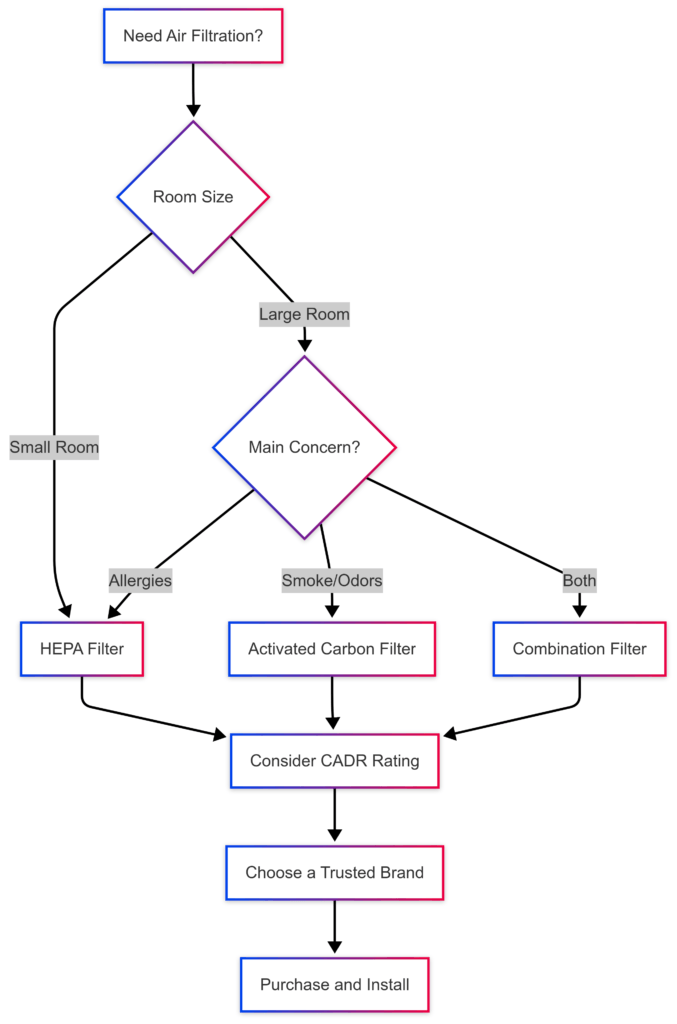
CADR stands for Clean Air Delivery Rate, and it is an important factor to consider when choosing an air purifier. CADR measures the volume of filtered air that an air purifier delivers per minute. A higher CADR indicates that the air purifier can clean a larger room more effectively.
When comparing air purifiers, it is important to look at the CADR for different types of pollutants, such as pollen, dust, and smoke. This will give you a better idea of how well the air purifier can remove specific pollutants from the air.
How to Make a Non-Smart Air Purifier Smart
If you already own a traditional air purifier and want to integrate it with your HomeKit setup, there are a few ways to make it smart:
- Use a Smart Plug: Plug your air purifier into a HomeKit-compatible smart plug. This will allow you to turn the air purifier on and off remotely using the Home app or Siri voice commands.
- Use a Smart Air Quality Monitor: Pair a HomeKit-compatible air quality monitor with your traditional air purifier. You can then create automation in the Home app to turn the air purifier on or off based on the air quality readings from the monitor.
While these methods do not provide the same level of control and integration as a dedicated HomeKit air purifier, they can be a cost-effective way to add some smart features to your existing air purifier.
How to Set Up and Use a HomeKit Air Purifier
Setting up a HomeKit air purifier is generally a straightforward process:
- Ensure Compatibility: Make sure your air purifier is HomeKit compatible. Look for the “Works with Apple HomeKit” logo on the packaging or in the product description.
- Prepare the Air Purifier: Some air purifiers may require you to remove packaging from the filter or install the filter before initial use. Refer to the manufacturer’s instructions for specific details.
- Power On: Plug in and power on your air purifier.
- Open the Home App: Open the Apple Home app on your iPhone or iPad.
- Add Accessory: Tap the “+” icon in the top right corner and select “Add Accessory.”
- Scan or Enter Code: Scan the HomeKit setup code that came with your air purifier or manually enter the code. The code may be located on the air purifier itself, on the packaging, or in the user manual.
- Connect to Wi-Fi: If your air purifier requires a Wi-Fi connection, follow the on-screen instructions to connect it to your home’s Wi-Fi network.
- Assign to Room: Assign the air purifier to a room in your home for easy control and automation.
- Start Using: Once set up, you can control your air purifier using the Home app, Siri voice commands, or through automation.
Troubleshooting Tips:
- If you are having trouble connecting your air purifier to HomeKit, make sure that your iPhone or iPad is connected to the same Wi-Fi network as your air purifier.
- If you are still having trouble, try restarting your air purifier and your iPhone or iPad.
- If you are using a Thread-enabled air purifier, make sure that you have a Thread border router, such as a HomePod mini or Apple TV 4K (2nd generation or later).
- Refer to the manufacturer’s instructions or support website for specific troubleshooting tips for your air purifier model.
Benefits of Using a HomeKit Air Purifier
Integrating an air purifier with HomeKit brings several advantages:
- Seamless Control: Control your air purifier using the Apple Home app or Siri voice commands. Adjust settings, turn it on/off, and monitor air quality remotely.
- Automation: Create automation to control the air purifier based on various factors, such as air quality, time of day, or location. For example, you can set your air purifier to turn on automatically when you arrive home or when the air quality drops below a certain level.
- Scenes: Include your air purifier in HomeKit scenes to control multiple devices simultaneously. For example, a “Goodnight” scene could dim the lights, adjust the thermostat, and turn on the air purifier in sleep mode.
- Remote Monitoring: Monitor your home’s air quality remotely and receive notifications when the air quality drops below a certain level. This can be especially helpful for people with allergies or respiratory sensitivities.
- Improved Air Quality: Enjoy cleaner and healthier air by removing pollutants, allergens, and odors. This can help to improve your overall health and well-being.
Conclusion,
Smart air purifiers with HomeKit compatibility offer a convenient and effective way to improve your home’s air quality. With their advanced filtration systems, smart features, and seamless integration with the Apple HomeKit ecosystem, these devices provide a comprehensive solution for cleaner and healthier indoor air. When choosing a HomeKit air purifier, consider factors such as room size, filtration technology, smart features, and your budget to find the best option for your needs.
Based on the research, the Airversa Purelle Smart Air Purifier stands out as a top pick due to its Thread support, compact design, and effective filtration. Thread offers a more reliable and responsive connection than Wi-Fi, making it a great choice for HomeKit users. The Purelle is also one of the most affordable HomeKit air purifiers with Thread support.
However, if you need an air purifier for a larger room, the Smartmi Air Purifier 2 may be a better option. It offers a higher CADR and a larger coverage area than the Purelle. Ultimately, the best HomeKit air purifier for you will depend on your individual needs and preferences.