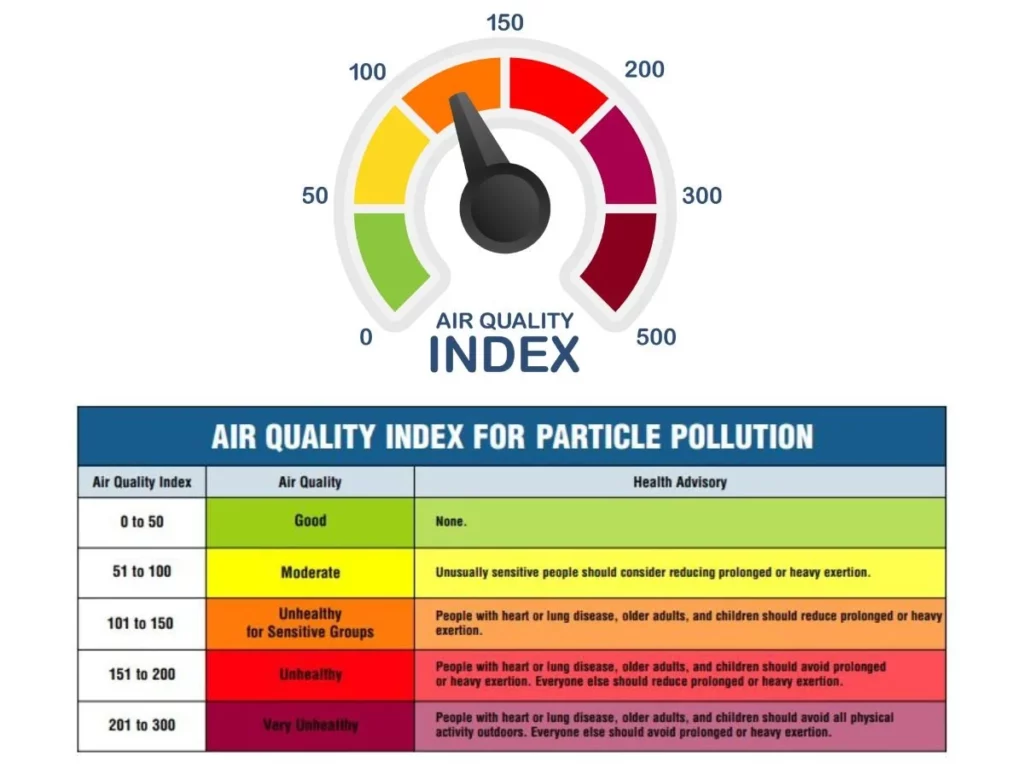
Have you ever wondered how your smart air purifier “knows” exactly when to ramp up its fan speed the moment you sear a steak or blow out a candle? It feels like magic, but it’s actually the result of sophisticated internal sensors.
Understanding the technology behind your Air Quality Index (AQI) readings is essential for maintaining a healthy home. While these sensors are incredibly helpful, they have specific strengths and limitations that every homeowner should understand.
How Smart Sensors “See” Pollution
Most modern smart purifiers rely on Laser Scattering Technology (also known as Mie Scattering). Here’s a breakdown of the process:
- Air Intake: A tiny internal fan draws a sample of your room’s air into a small chamber.
- Laser Interaction: A laser beam strikes the particles floating in the air.
- Light Reflection: The particles scatter the light, and a photo-detector measures the intensity and pattern of that scattering.
- Data Conversion: The device uses algorithms to translate that light pattern into a numerical value—the PM2.5 concentration you see on your app.
PM2.5 vs. VOCs: Know the Difference
It is a common misconception that one sensor tracks everything. In reality, your purifier likely uses two different types of hardware:
- PM2.5 Sensors: These detect “Particulate Matter” like dust, smoke, and pollen. If you need high-quality replacements for your sensor-driven units, checking reputable suppliers like FiltersFast ensures your machine stays accurate.
- VOC Sensors: These detect “Volatile Organic Compounds” or gases (like paint fumes or cleaning chemicals). These sensors use a heated metal-oxide semiconductor to detect chemical changes in the air rather than physical particles.
Pro Tip: According to the EPA’s research on indoor air, indoor air can be 2 to 5 times more polluted than outdoor air. Relying on real-time sensors helps you catch these invisible spikes.

Are On-Board Sensors Accurate?
While smart purifiers provide excellent relative data, they aren’t quite as precise as $10,000 laboratory-grade monitors. However, for home use, their ability to detect trends is what matters most.
| Feature | Consumer Smart Sensor | Professional Monitor |
| Technology | Laser Scattering | Gravimetric/Beta Attenuation |
| Best For | Detecting spikes (cooking, smoke) | Regulatory compliance |
| Cost | Integrated into purifier | High ($500 – $5,000+) |
| Maintenance | Occasional vacuuming | Frequent calibration |
If you are looking for medical-grade or heavy-duty filtration systems that integrate seamlessly with professional-level HVAC monitoring, FieldControls offers robust solutions for whole-home air management.
How to Get the Most Out of Your AQI Readings
To ensure your smart purifier is giving you the most honest “Truth About AQI,” follow these three steps:
- Placement is Key: Don’t hide your purifier in a corner or behind a couch. Sensors need airflow to get an accurate reading of the whole room.
- Clean the Sensor Lens: Every 3–6 months, use a Q-tip or a vacuum to clear dust from the small sensor window on the back or side of your unit.
- Trust the Auto-Mode: High-quality units use their sensor data to adjust speeds. This saves energy and extends the life of your filters by only working hard when the air actually demands it.
For more deep dives into the best hardware for your home, explore our latest reviews at BestSmartPurifiers.com.
Troubleshooting Common Sensor Myths
It’s easy to get frustrated when your air purifier shows a “Red” warning despite the room feeling clean, or stays “Green” while you’re cooking. To truly master your indoor air quality, you need to look beyond the numbers and understand the “why” behind sensor behavior.
1. The Humidifier “Ghost” Effect
If you use an ultrasonic (cool mist) humidifier, you might notice your air purifier’s AQI spiking to 999 or turning bright red.
- The Myth: Your humidifier is creating pollution.
- The Reality: These humidifiers vibrate water into tiny droplets. Because laser sensors identify particles by size, they “see” these micro-droplets of water as PM2.5 dust or smoke.
- The Fix: Use an evaporative (wick-type) humidifier or move the purifier to the opposite side of the room to avoid false alarms.
2. VOC Sensors and “Invisible” Spikes
Unlike the laser sensor, the VOC sensor reacts to gases. You might see a spike when:
- You use hairspray, perfume, or nail polish remover.
- You are peeling an orange (limonene is a VOC!).
- You have new furniture or carpets with “off-gassing” chemicals. If your sensor is constantly high, check for open cleaning supplies nearby. For those dealing with heavy chemical odors, FieldControls systems are designed with the specialized carbon stages needed to actually neutralize these odors.
Pro Maintenance: Resetting Your Accuracy
Even the best smart sensors can “drift” over time as dust builds up on the internal lens. If your readings seem stuck, try this 3-Step Calibration Hack:
- The Fresh Air Baseline: On a clear day, open your windows for 10 minutes, then place the purifier near the window. Many smart units (like those from Levoit or Blueair) use this “cleanest” air to recalibrate their internal zero-point.
- The Vacuum Trick: Locate the small sensor door (usually a small square or slatted area on the side). Use a vacuum hose or a can of compressed air to clear out any “phantom dust” trapped inside.
- The Q-Tip Clean: Some high-end models allow you to open the sensor cover. Gently wipe the tiny glass lens with a dry cotton swab to restore laser clarity.
Ensuring Long-Term Performance
Remember that a sensor is only as good as the filter it’s protecting. A clogged filter can cause back-pressure that messes with air sampling. Regularly replacing your HEPA media via FiltersFast ensures that when the sensor detects a spike, the machine actually has the “lungs” to clean it.
The Bottom Line
Your smart purifier’s AQI sensor is a powerful tool for detecting patterns, not a laboratory instrument for exact counts. Use it to identify your home’s “danger zones”—like high-traffic mornings or dinner prep—and let the automation do the heavy lifting.